Goal-setting proof of concept
Achiever is a goal app built around people instead of reminders. A partner checks on you, a small crew sees your check-ins, and your progress reads at a glance. I designed it for a stealth startup, from the first conversations to a clickable iOS prototype, in eight weeks.
The goal was to define the product, test the core idea cheaply, and leave the team with a prototype they could put in front of investors and early users. I was the only designer, working directly with the founder.
Outcomes
What changed because of the work.

What I designed
The things I designed and shipped on this project.
- Market review, proto-personas and a journey map
- Design principles, core loops and navigation
- Low-fi wireframes and quick tests
- Onboarding that brings in a crew and a partner before the first goal
- A weekly home with check-ins, proof, pace and missed-week recovery
- Crew and two-way partner accountability with nudges
- Templates, milestones and stakes judged by your partner
- Progress, lessons in context, chats and a small design system
The brief
The problem, what I designed, and the result.
People rarely fail at goals for lack of a plan. They drop off around week three, and reminders are easy to swipe away. The founder wanted a goal app where other people, not the app, keep you going.
A market review, informal conversations, proto-personas, a journey map, low-fi tests, a visual system and a clickable iOS prototype, as the only designer working directly with the founder.
A clickable iOS prototype with 39 screens across seven flows, a small design system, handoff notes and a test plan. The founder took it into investor and early-user conversations.
Most people know what to do. They just stop doing it.
People don't usually fail at goals because they lack a plan. They fail somewhere around week three, when the first excitement is gone and a busy week gets in the way. One miss turns into two, two turns into quiet, and the goal disappears without anyone noticing.
Most goal and habit apps answer that with more reminders. The thing is, reminders are easy to swipe away. A friend asking where you were this morning is not.
The brief: a friend at the door, not a notification
The founder came to me with an idea and a rough MVP direction: a goal app where other people, not the app, keep you going. Skipping a morning run is easy when your phone buzzes. It's a lot harder when a friend is standing at your door. The brief came down to four things:
- Support people, but use the group to hold each other accountable.
- Use game mechanics and behavioural psychology to keep people committed.
- Keep it easy, with guided flows instead of blank forms.
- Show timely, easy-to-read progress, so people always know where they stand.
The audience was mostly men, roughly 25 to 45, working on money, fitness, career or learning goals. Many had tried habit apps before and dropped them. What they were missing was someone who notices when they don't follow through. The "mostly men" focus came from the founder's target market. It shaped the tone, imagery and colour, and it's something to keep checking as the product grows.
Eight weeks, one designer
With a founder making decisions quickly, I kept research light and close to the product, and pushed to get something testable in front of people by week five.

What other apps get right
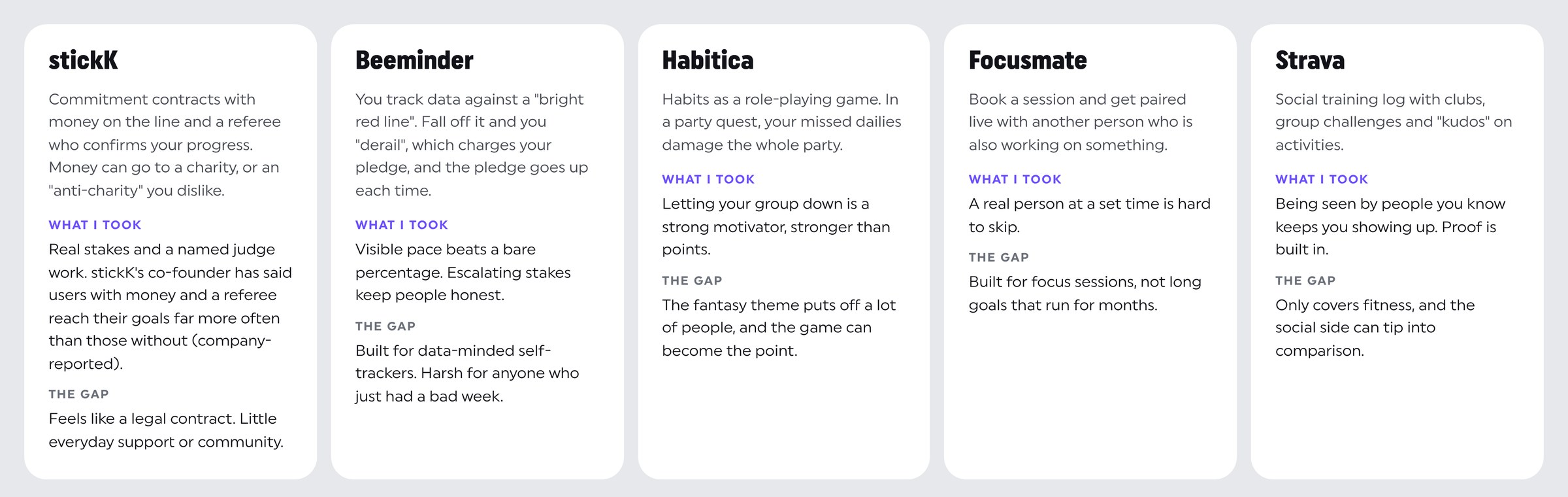
I looked at the products people already use to stick to goals: stickK, Beeminder, Habitica, Focusmate and Strava. Each one gets part of the answer right. stickK shows that real stakes with a named judge work. Beeminder shows that visible pace beats a bare percentage. Habitica shows that letting your group down is a stronger motivator than losing points. Focusmate shows that a real person at a set time is hard to skip, and Strava shows that being seen by people you know keeps you showing up.
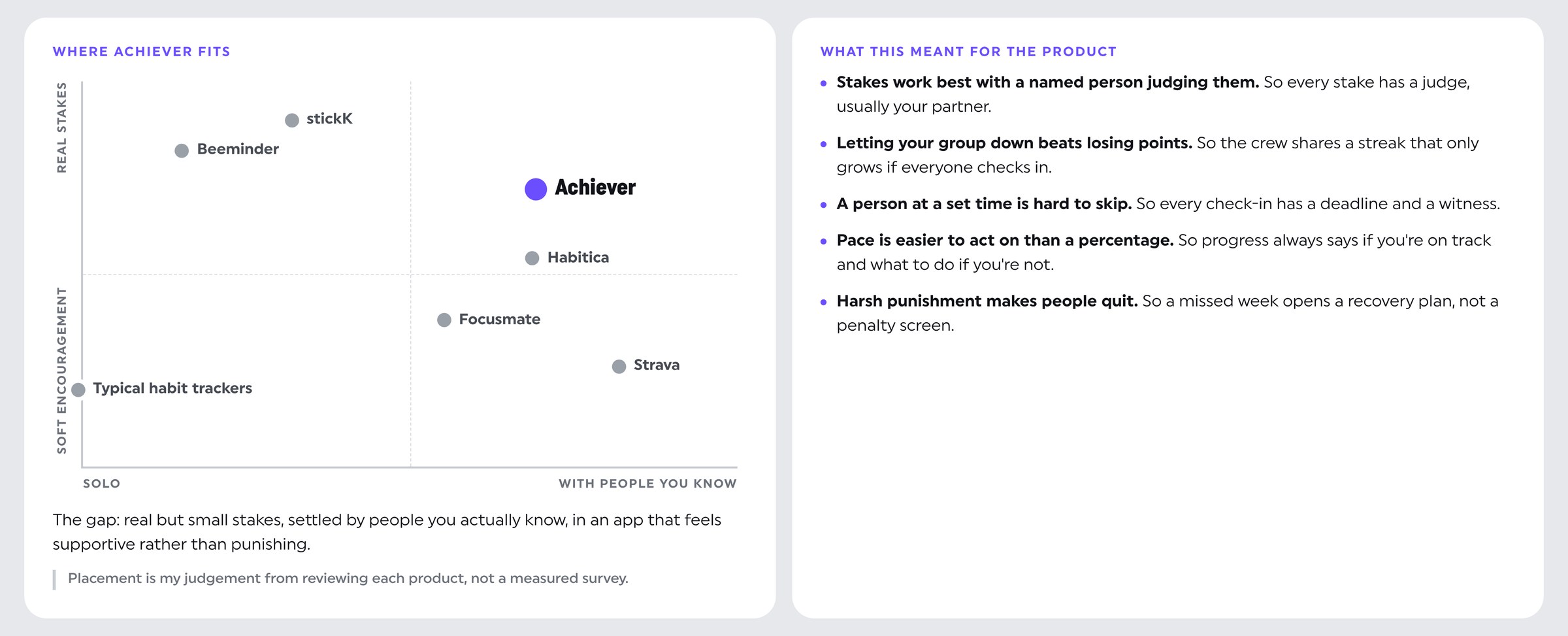
None of them combines everyday support, people you know, and real but small stakes in one place. That gap became the product: small stakes, settled by people you actually know, in an app that feels supportive rather than punishing. The placement on the map below is my own judgement from reviewing each product, not a measured survey.
Sources: stickK (Wikipedia) · What is Beeminder · Beeminder: derailing · Habitica wiki: obstacles and party damage · Focusmate: purpose · Strava group challenges
What I heard
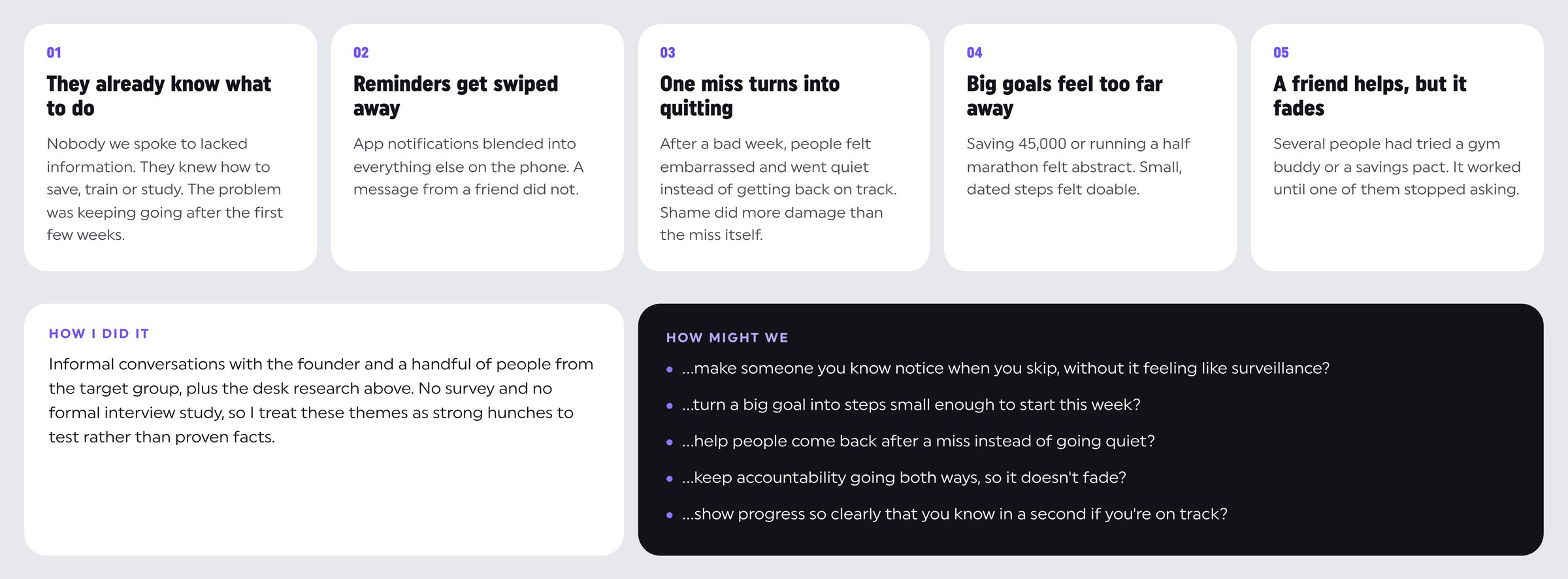
I had informal conversations with the founder and a handful of people from the target group, on top of the desk research. There was no survey and no formal interview study, so I treat these themes as strong hunches to test rather than proven facts. Five of them kept coming up, and they pointed the same way as the market research: the missing piece isn't knowledge or tracking, it's another person.
Three people the product had to work for
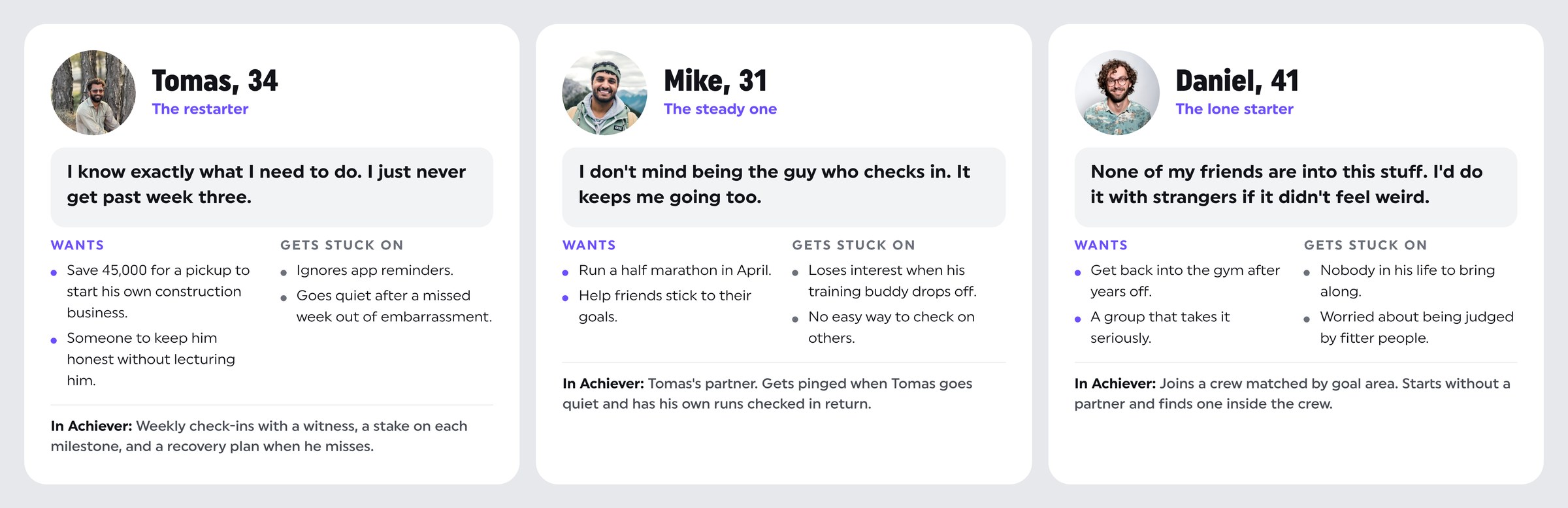
From the conversations I built three proto-personas. They're working hypotheses, not validated segments. Tomas is the restarter, who knows exactly what to do but never gets past week three. Mike is the steady one, who doesn't mind being the person who checks in because it keeps him going too. Daniel is the lone starter, who has nobody in his life to bring along and worries about being judged by fitter people.
Week three is where goals die
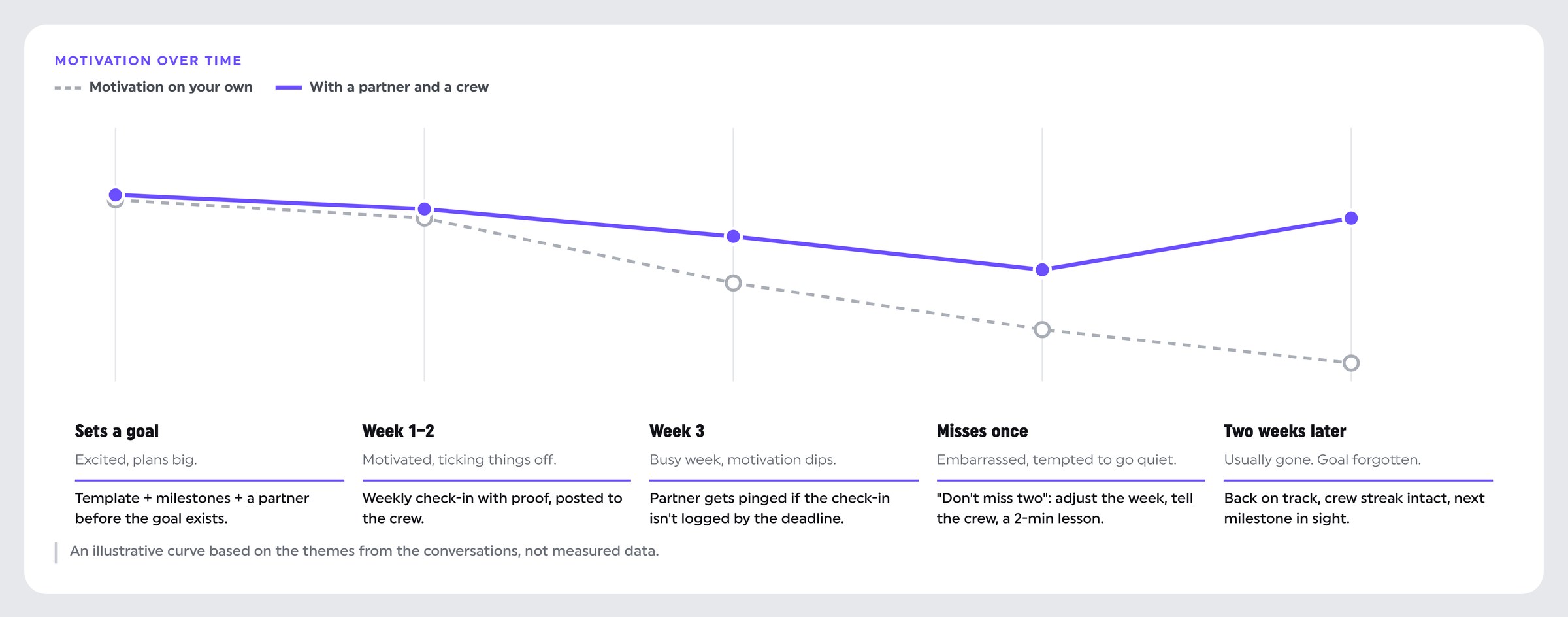
I mapped Tomas's goal over a typical first month. The dip around week three is where most goals die, so that's where the product does most of its work: a partner who gets pinged when a check-in isn't logged, and a "don't miss two" recovery plan after the first miss. The curve is illustrative, based on the themes from the conversations, not measured data.
Six rules and the mechanics behind them
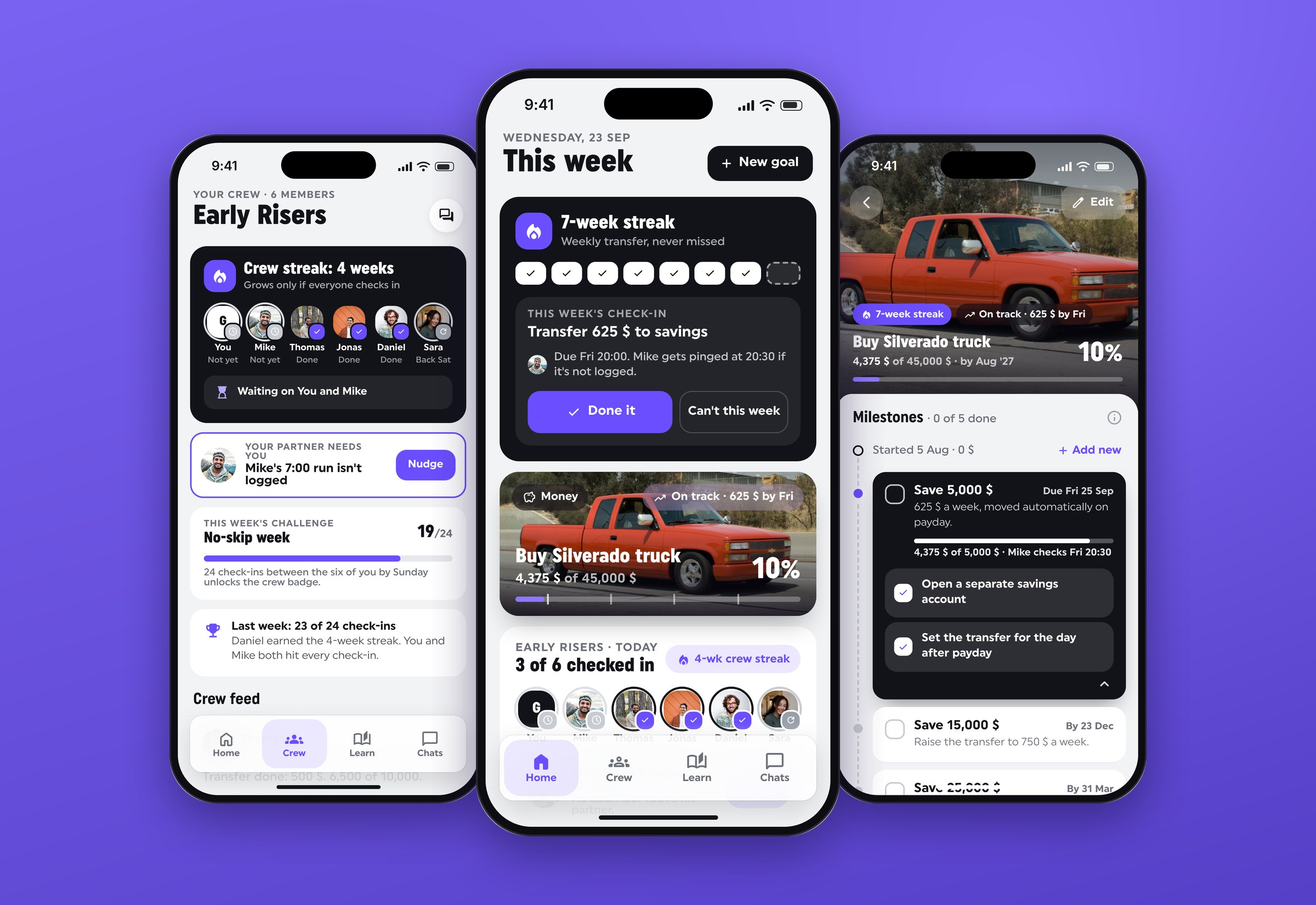
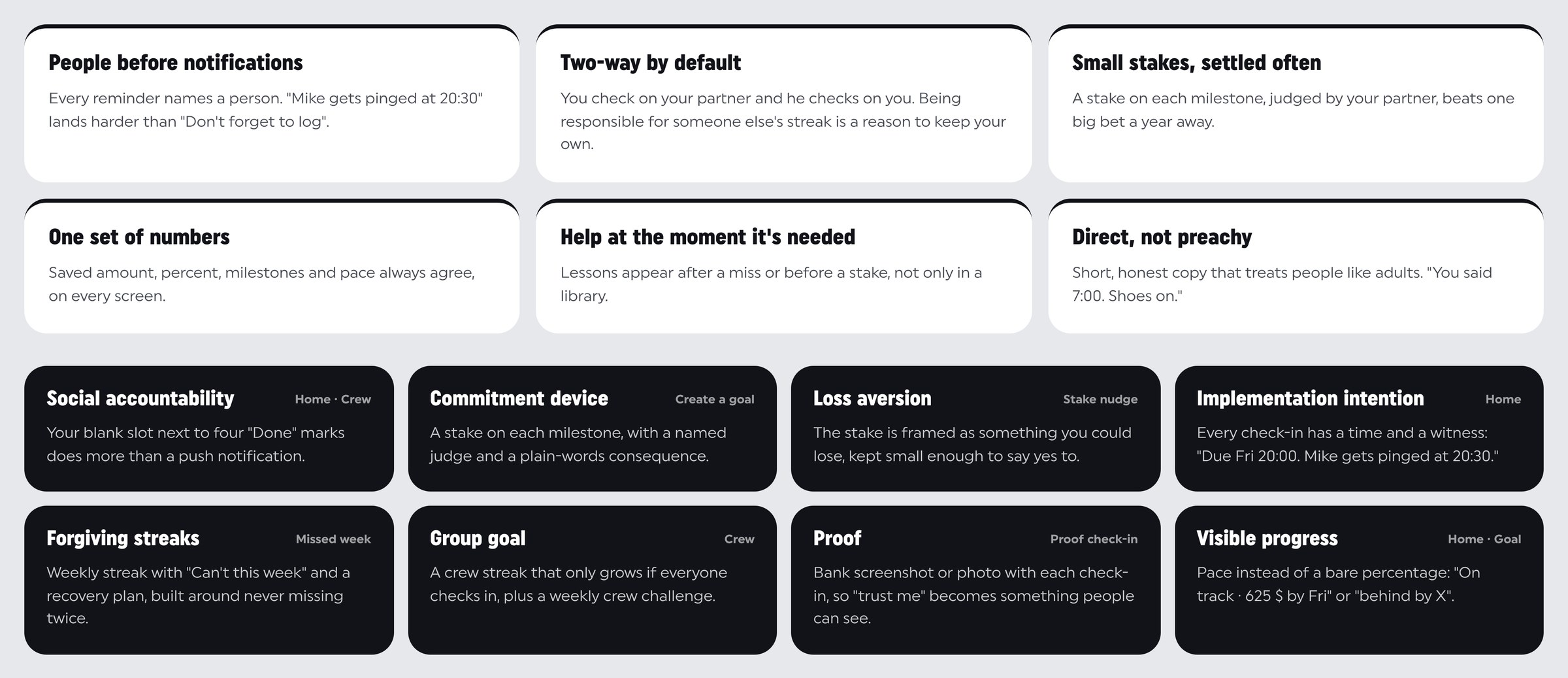
I used six rules to settle design decisions: people before notifications, two-way by default, small stakes settled often, one set of numbers, help at the moment it's needed, and direct copy that isn't preachy. The game-like parts are deliberately few, and each one is tied to a person rather than to points. Every check-in has a time and a witness ("Due Fri 20:00. Mike gets pinged at 20:30"), every stake has a judge, and the crew shares a streak that only grows if everyone checks in.
Four loops, four tabs
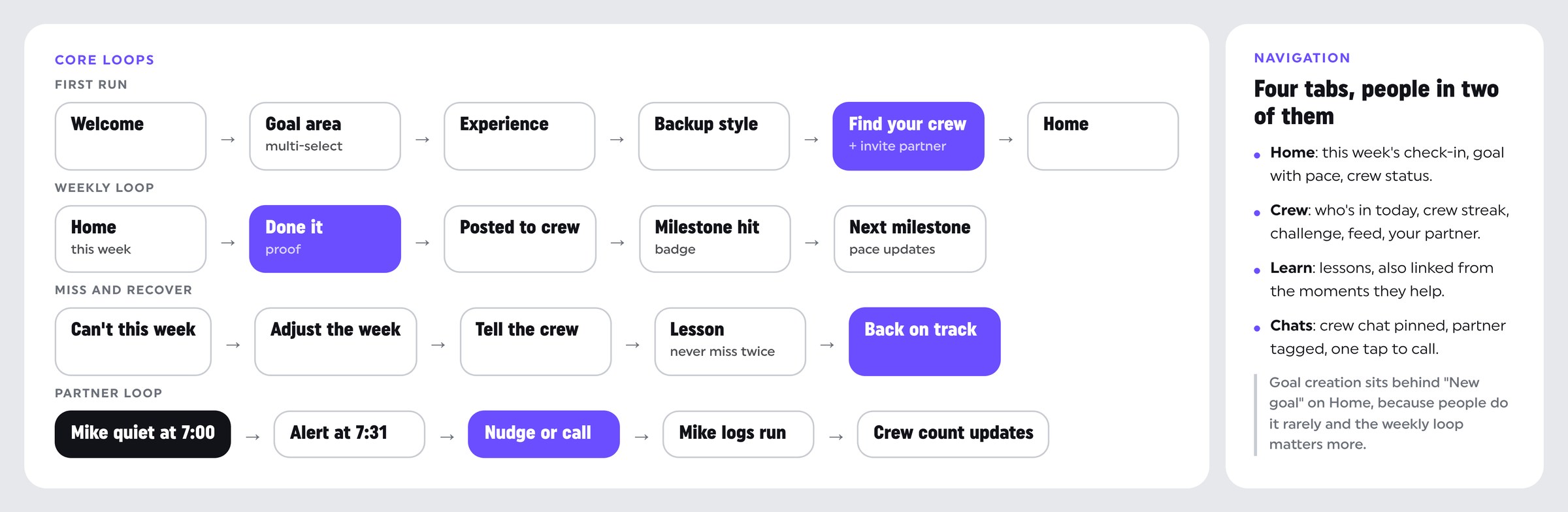
Before drawing screens I mapped the four loops the app has to support: the first run, the weekly check-in, missing and recovering, and the partner loop. Everything in the navigation exists to keep those loops short. There are four tabs, and people are in two of them. Goal creation sits behind "New goal" on Home, because people do it rarely and the weekly loop matters more.
Low-fi first, then quick tests
I sketched the core screens in grey boxes first and put them in front of a few people from the target group in quick, informal sessions. Nothing formal and no numbers, but it was enough to move the product in the right direction before any visual design.
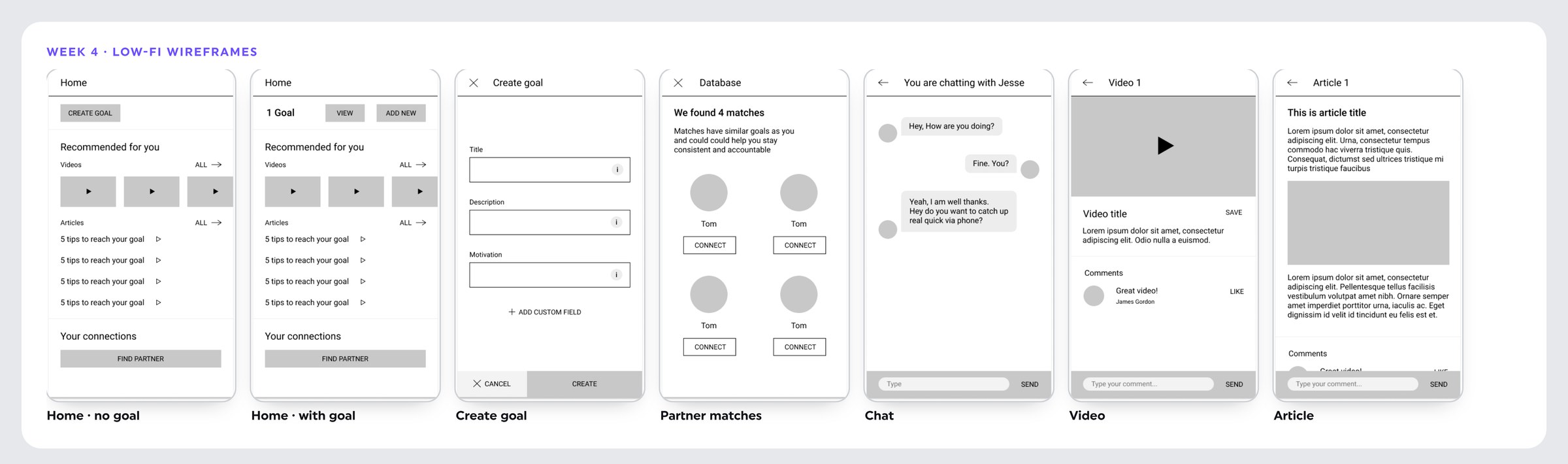
Five things changed because of those sessions:
- Home led with content. People kept asking what they were supposed to do today, so Home now opens on this week's check-in, then progress with pace, then the crew. Lessons moved to their own tab and to the moments they help.
- The partner sat at the bottom. "Find partner" felt optional and most people never got to it, so finding a crew and inviting a partner moved into onboarding, before the first goal exists.
- A blank form stalled people. Goals now start from templates other people finished, then break into milestones with dates, tasks and a stake.
- Matches felt random. A grid of strangers gave nobody a reason to pick anyone. Crews are now matched by goal area, and partners come from your contacts or from inside your crew.
- Chat was just chat. Crew chat is now pinned, the partner is tagged, and alerts offer "Log it" or "Call Mike" directly.
Calm and confident, not playful
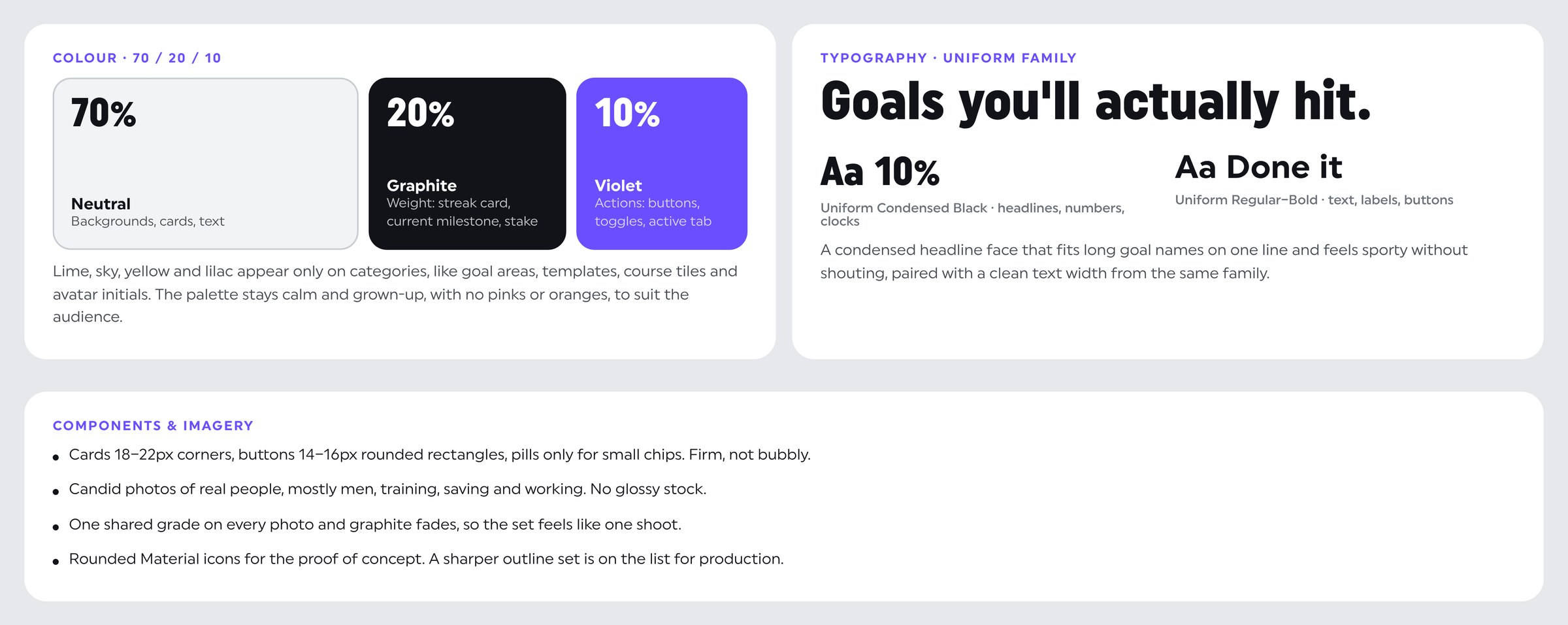
Most of the screen is neutral, the heavy moments are graphite, and violet only marks what you can tap, in a 70/20/10 split. Lime, sky, yellow and lilac appear only on categories, and the palette stays calm and grown-up to suit the audience. A condensed headline face from the Uniform family fits long goal names on one line and feels sporty without shouting. Photos are candid shots of real people with one shared grade, so the set feels like one shoot.
Onboarding: your people before your goal
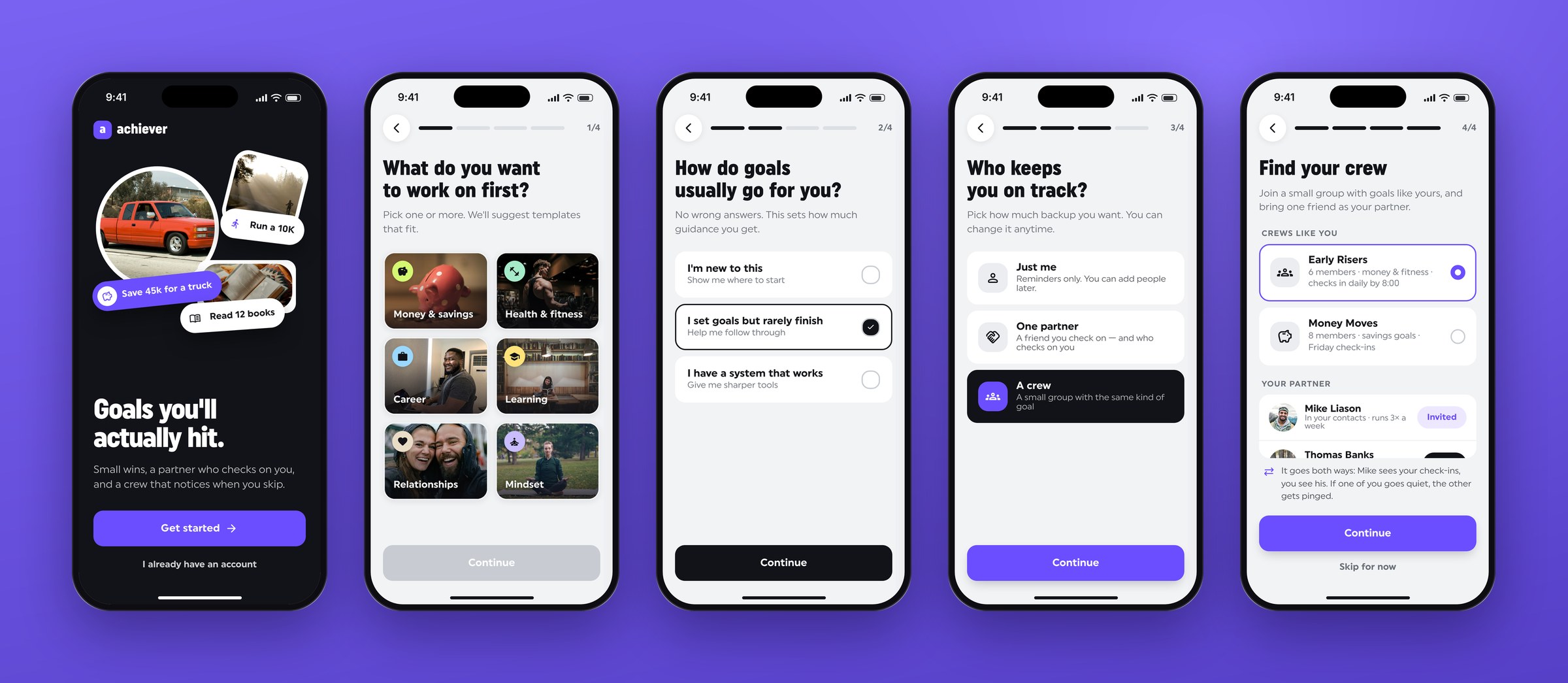
People sign up full of energy and set goals alone. By the time they need support, there's nobody around to give it. So finding a crew is part of onboarding, before any goal exists. Three light questions set your goal area, experience and how much backup you want. Then you join a crew matched to your goal area and invite one partner, with a line that makes clear it goes both ways. "Skip for now" stays visible, so nobody feels trapped.
Home: what's due, and am I on track?
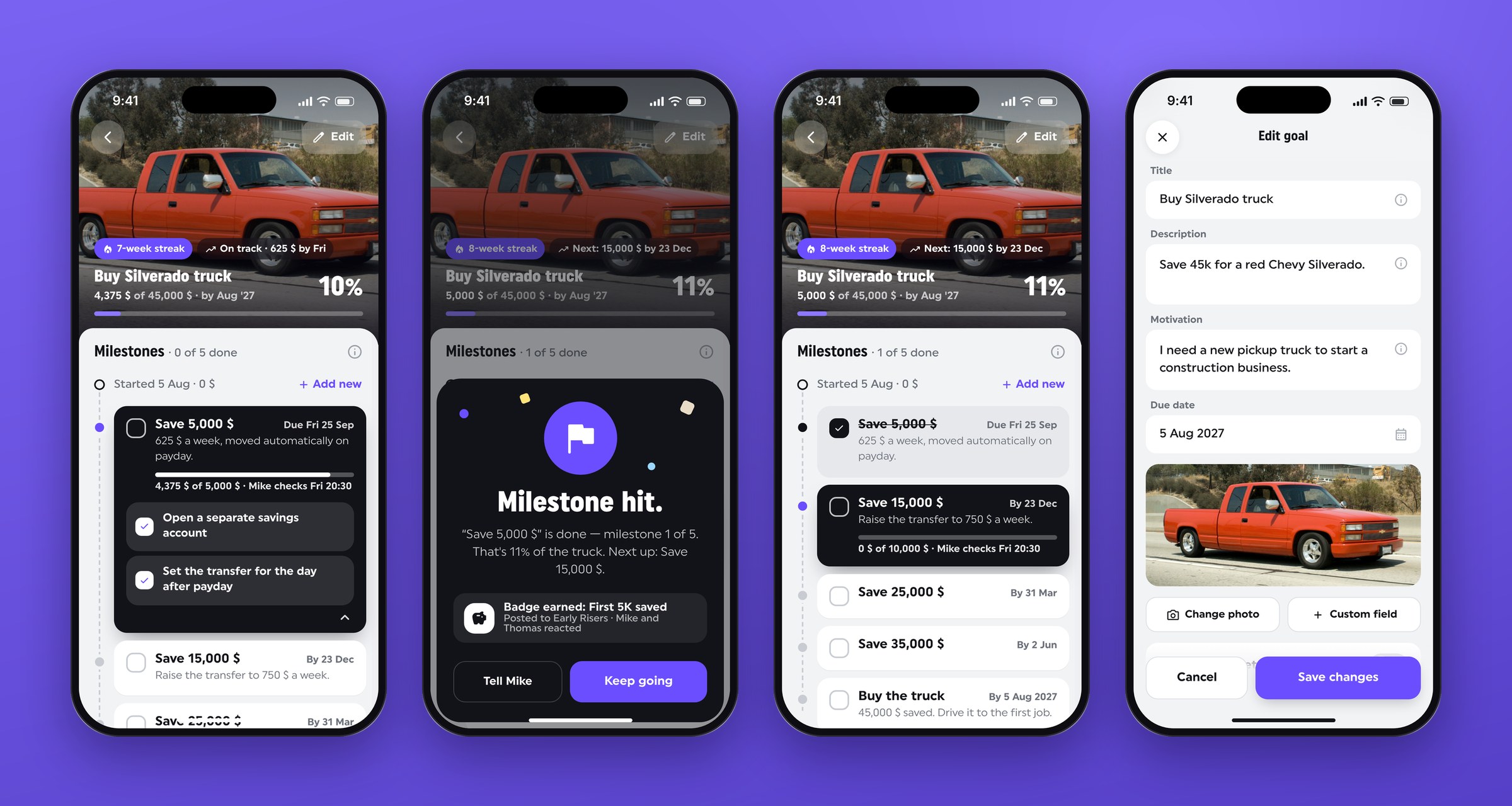
People open the app needing to know one thing fast. Home has a fixed order: what's due, then progress with pace, then the crew. Each check-in shows its deadline and its witness. "Done it" asks for proof, like a bank screenshot, and posts it to the crew, which turns "trust me" into something people can see. When a check-in closes a milestone, you get a short celebration and a badge.
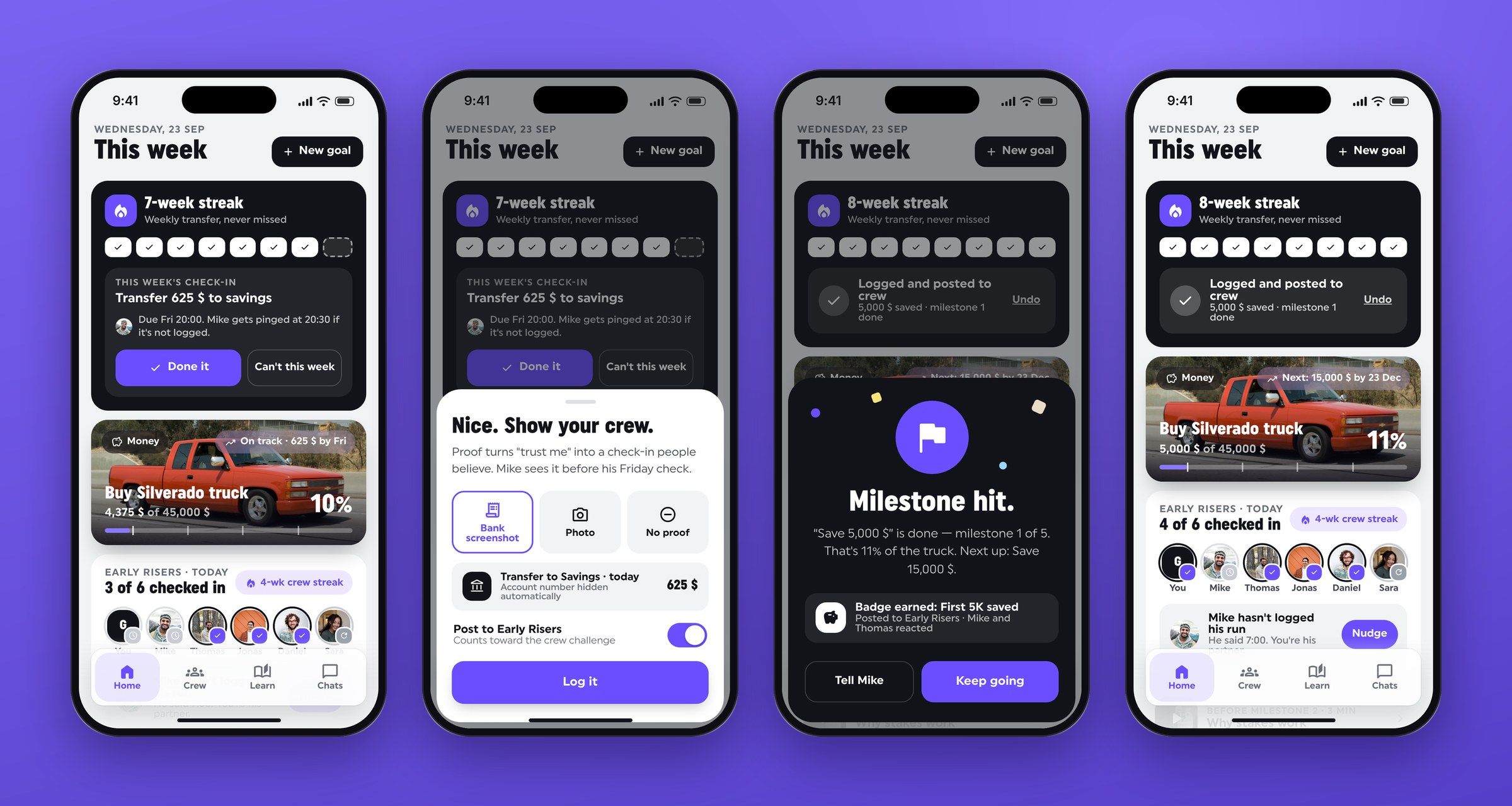
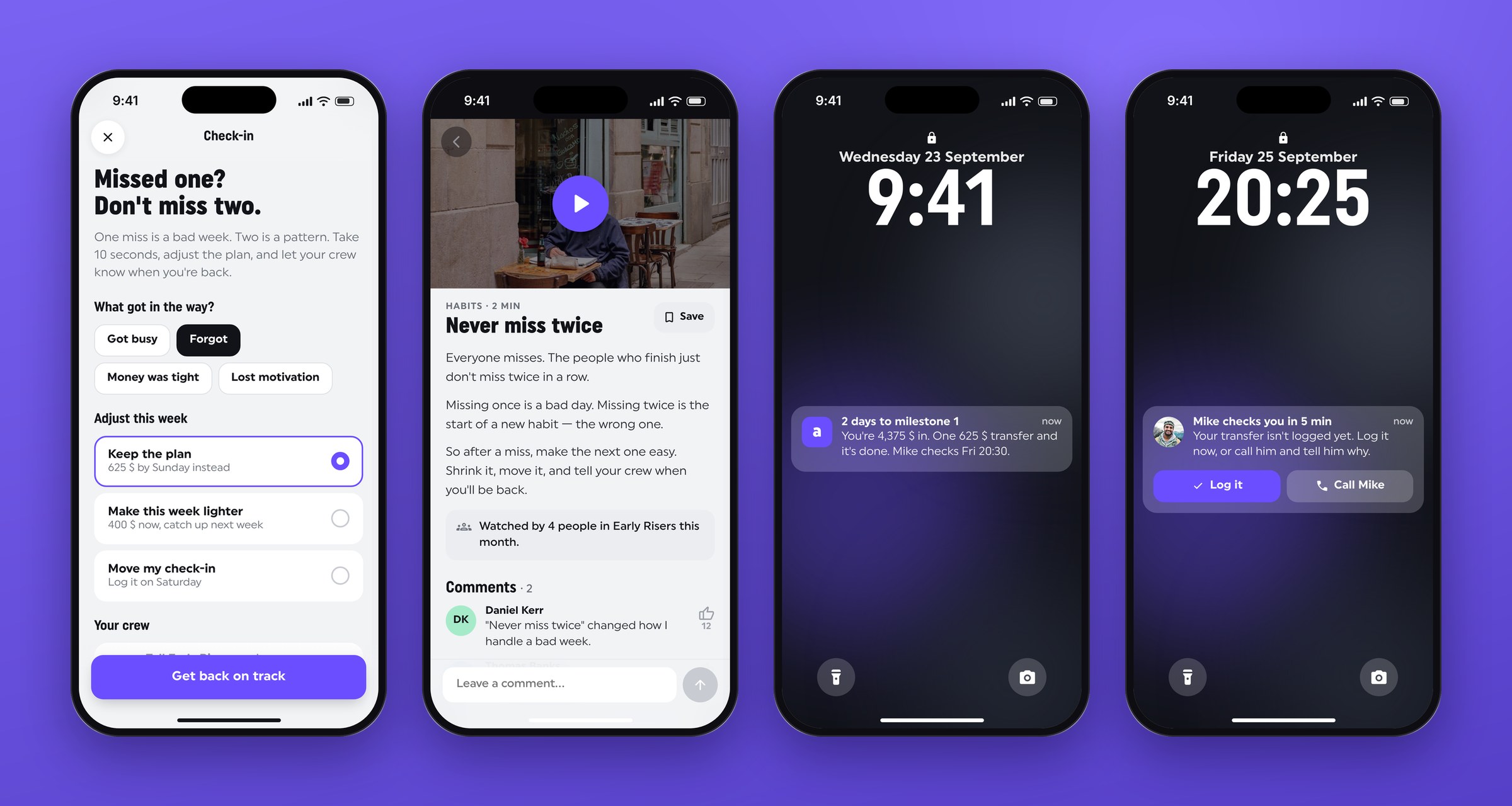
"Can't this week" opens a recovery plan, not a failure state. It asks what got in the way, offers three ways to adjust the week and lets the crew know you're regrouping. A two-minute lesson called "Never miss twice" opens right from that screen, and reminders always name the person who's waiting.
Crew and partner: accountability both ways
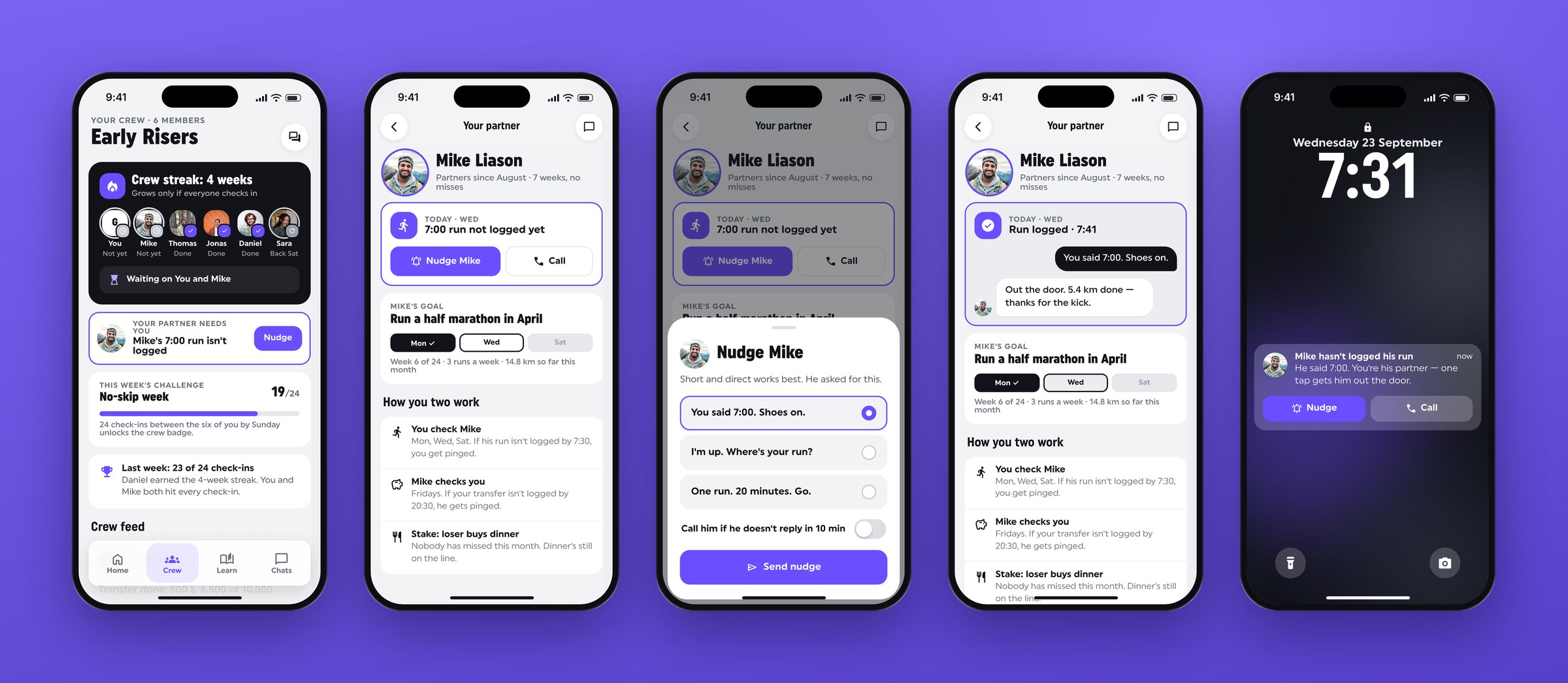
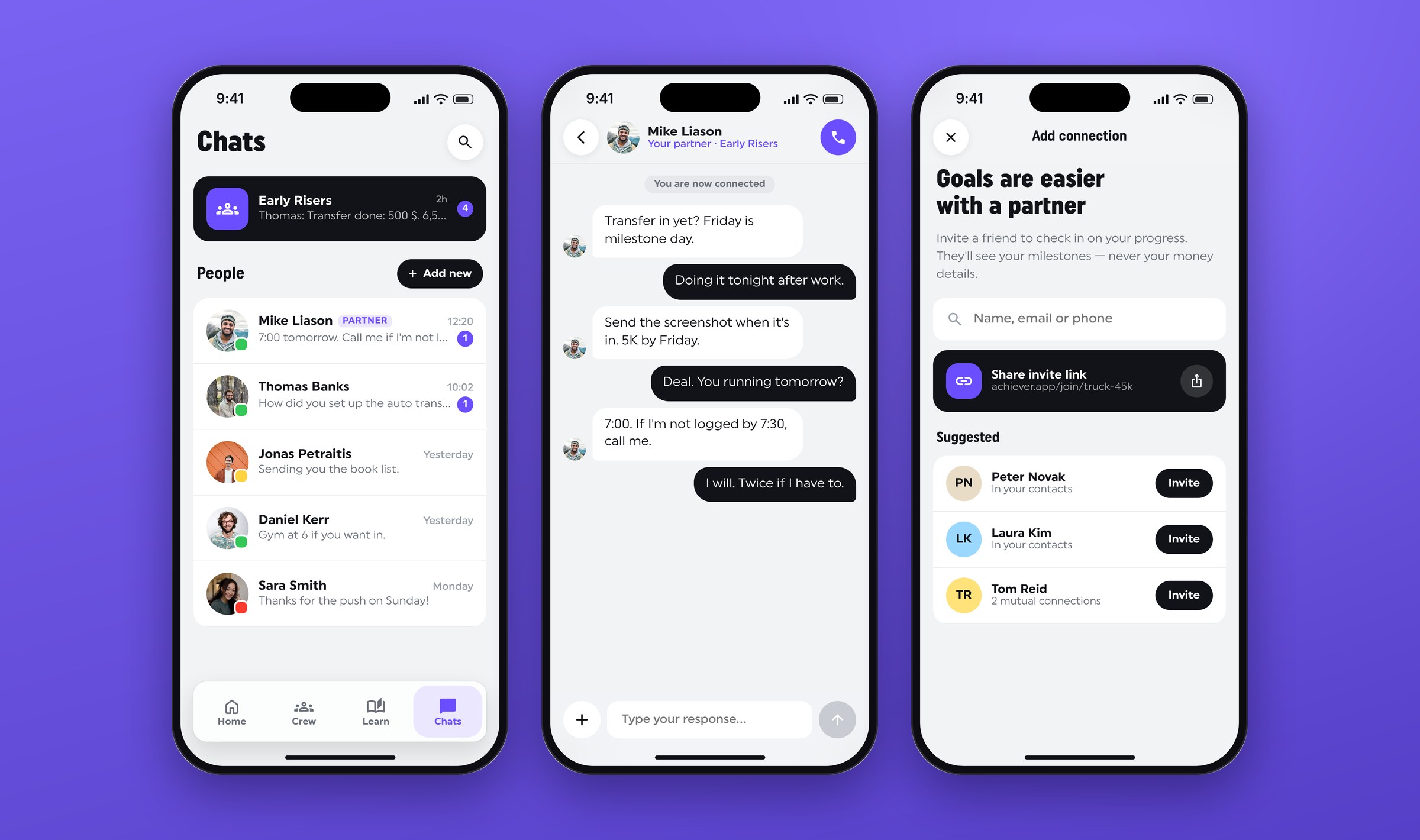
Accountability fades when it only runs one way, or when the person checking in doesn't know what they're meant to do. The crew tab shows who's in today, a crew streak that only grows if everyone checks in, and a weekly challenge. The partner view spells out the rules of the pair: who checks whom, when, and what's at stake. Nudges are short and pre-written, with an optional call if he doesn't reply, and a lock-screen alert tells you when your partner goes quiet.
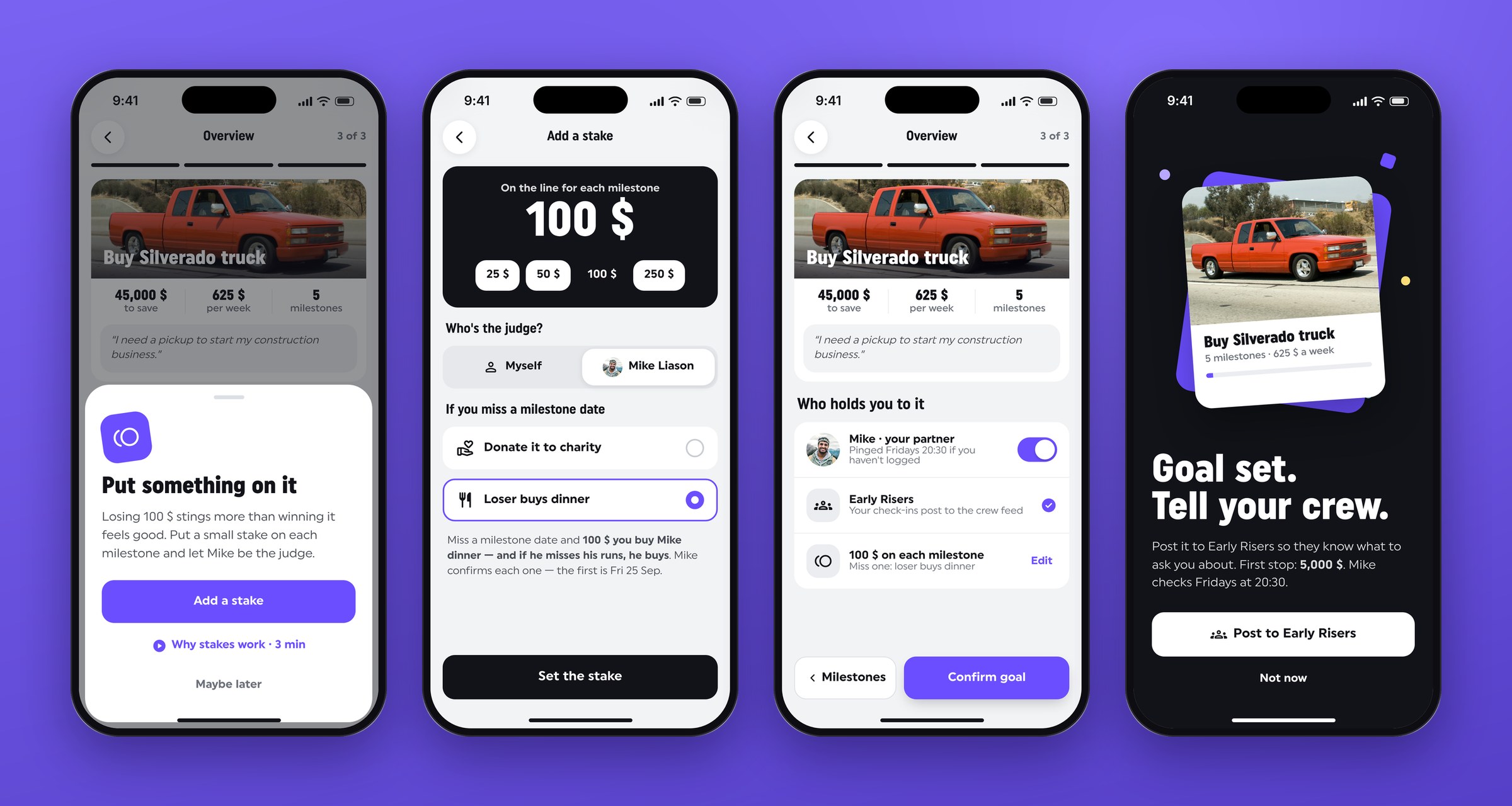
Creating a goal with something on the line
Big goals feel far away, and a blank form is hard to fill in. Templates show how many people used a plan and how many finished it. Then three steps turn the goal into milestones with dates and tasks, and the partner gets pinged if one isn't logged.
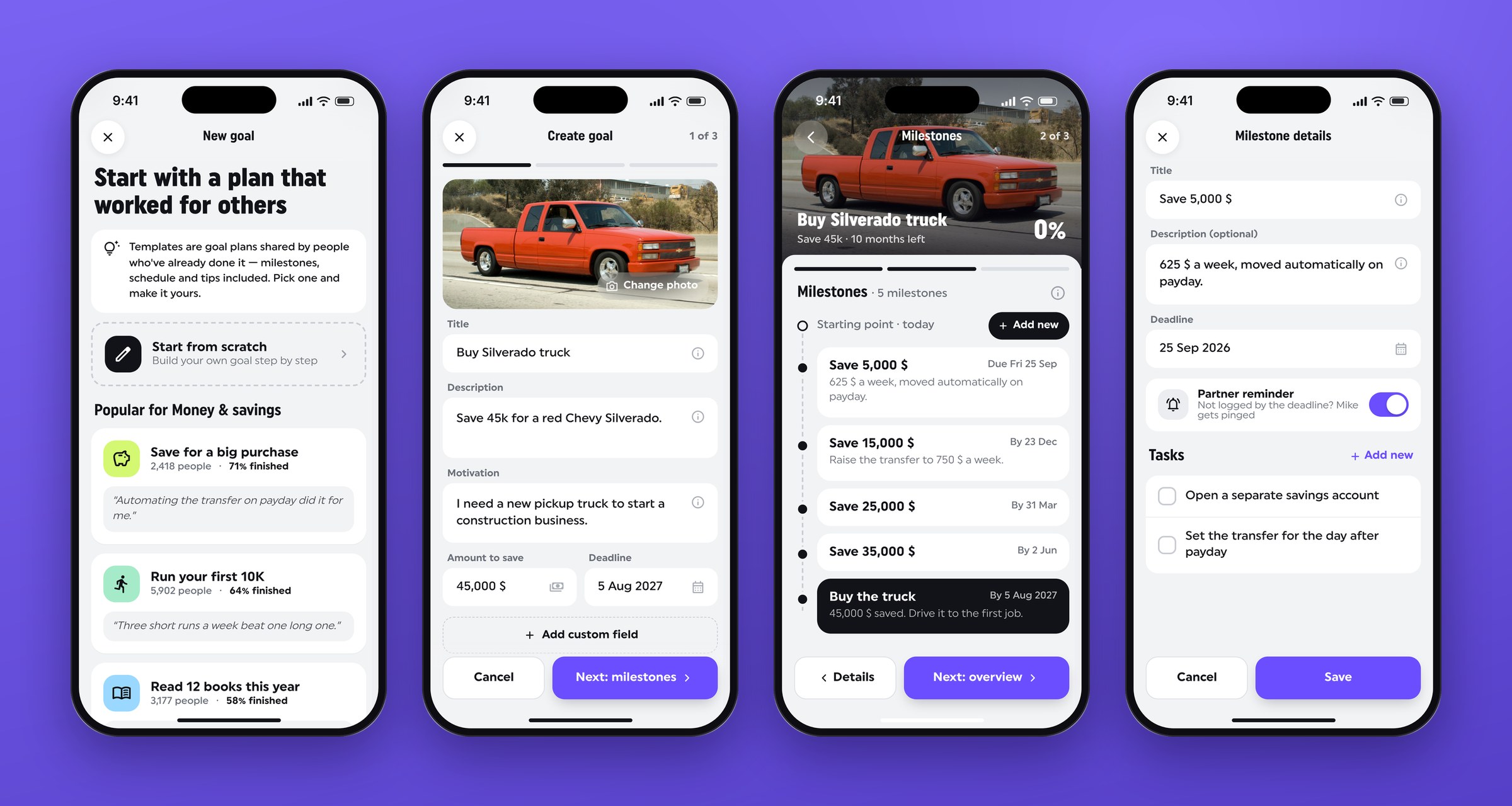
A single bet a year out is too distant to change what you do this week. So each milestone gets a small stake, judged by your partner. "Loser buys dinner" or a charity donation keeps him on your side, and the last step is posting the goal to your crew.
Progress you can trust
A percentage on its own doesn't tell you if you're doing well, and mixed signals make people stop trusting the numbers. So there's one progress model everywhere: 4,375 of 45,000 $, 10%, 0 of 5 milestones, and they always agree. Progress shows pace instead of a bare percentage: on track, or behind and by how much. The current milestone is graphite and the done ones go neutral, so only one thing stands out.
Lessons and chat at the right moment
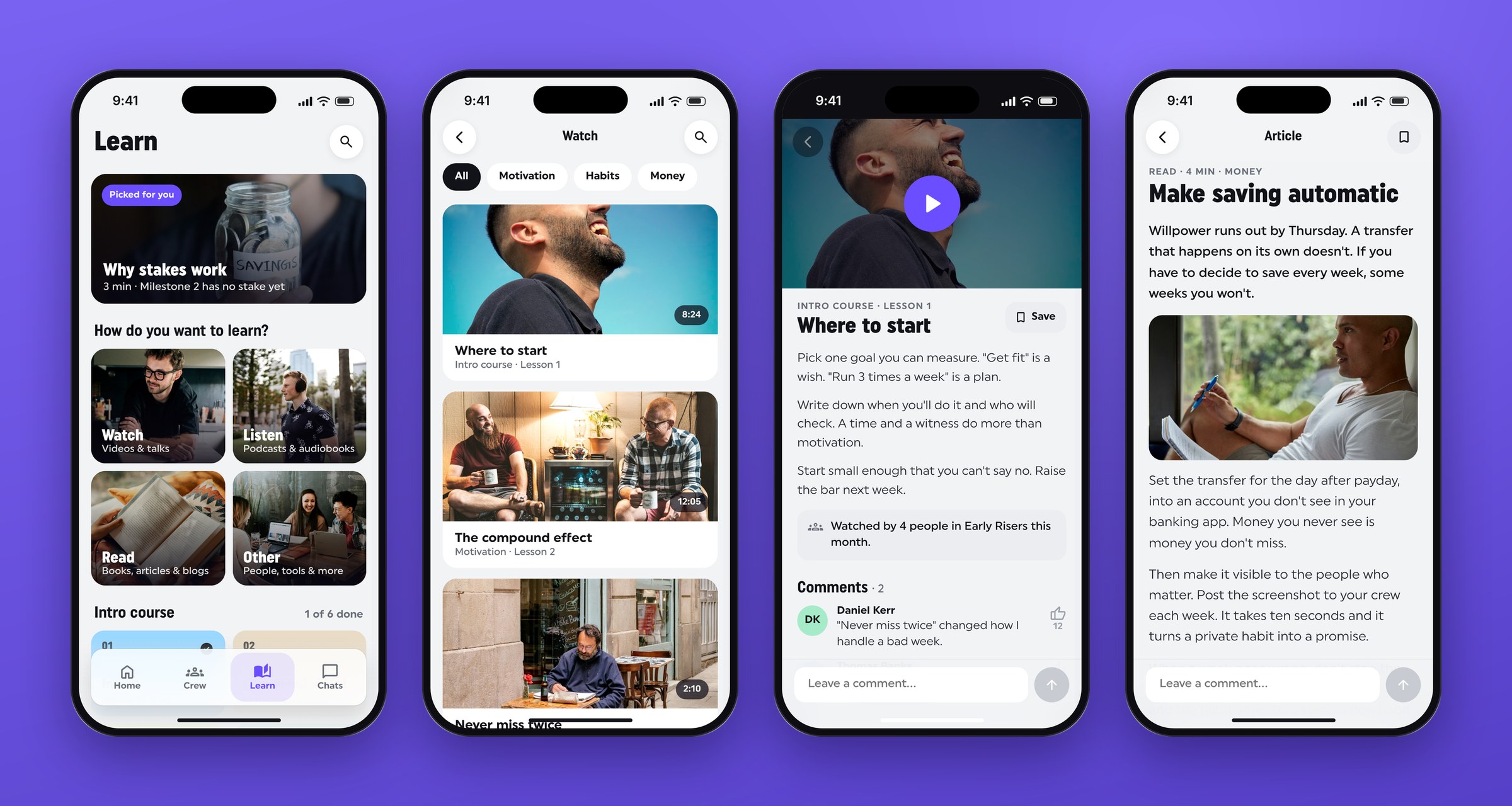
Advice in a library rarely gets read when it would help, so lessons show up right after a miss or before a stake, and each one shows how many people in your crew watched it. The best accountability happens in real conversation, so the crew chat is pinned on top, your partner is one tap from a call, and alerts offer "Log it" or "Call Mike" instead of just "Open app". The app's job is to get two people talking, then step out of the way.
The result
In eight weeks the founder got a clickable iOS prototype covering onboarding, the weekly loop, crew and partner, goal creation, progress, learning and chat: 39 screens across seven flows. It came with a small design system, the proto-personas, journey map and market review, handoff notes and a test plan for the next phase. The founder took the prototype into investor and early-user conversations.
The hi-fi prototype hasn't been tested yet. These are the tasks I'd run in five or six moderated sessions:
- Join a crew and invite a partner during onboarding, without help.
- Log this week's check-in with proof.
- Answer "Are you on track for the truck?" from Home, and time it.
- Notice your partner hasn't logged his run and nudge him.
- Skip a week and get back on track.
There are open questions too. Bank screenshots need account numbers hidden automatically. A partner can only nudge so often before it turns into nagging. Real-money stakes raise legal and payment questions per country. Crews of strangers have to feel safe, or the idea fails for people like Daniel. And leaning male in the imagery fits the main audience, but it shouldn't push anyone else away.
What I took from it: the product isn't the tracker, it's the people around it. Early on it was tempting to make Achiever smarter, with better reminders, nicer charts and more content. The quick tests pulled me the other way. People didn't need the app to know more, they needed someone to notice. Once the partner and the crew became the centre of the design, most other decisions followed.
What the team said
More case studies




Book a 20-minute intro call
Slots show in your own time zone.
Let’s see if it’s a fit.
Twenty minutes is usually enough: the role, the product, and how your team works.


Ask AI about my work
AI answer, based on my case studies and CV
Answers show up here as they're written. I keep them short and point you to the case study they come from.
AI can get things wrong. If something matters, check the case study or email me at hi@gytismark.com.